For physiotherapists, chiropractors & osteopaths

Show your patient what's going on.
In seconds.

Free 3D anatomy tool for live consultations. Tap a body region, the anatomy highlights, the patient understands. No more drawing on paper.
Try Clinical ModeLearn more
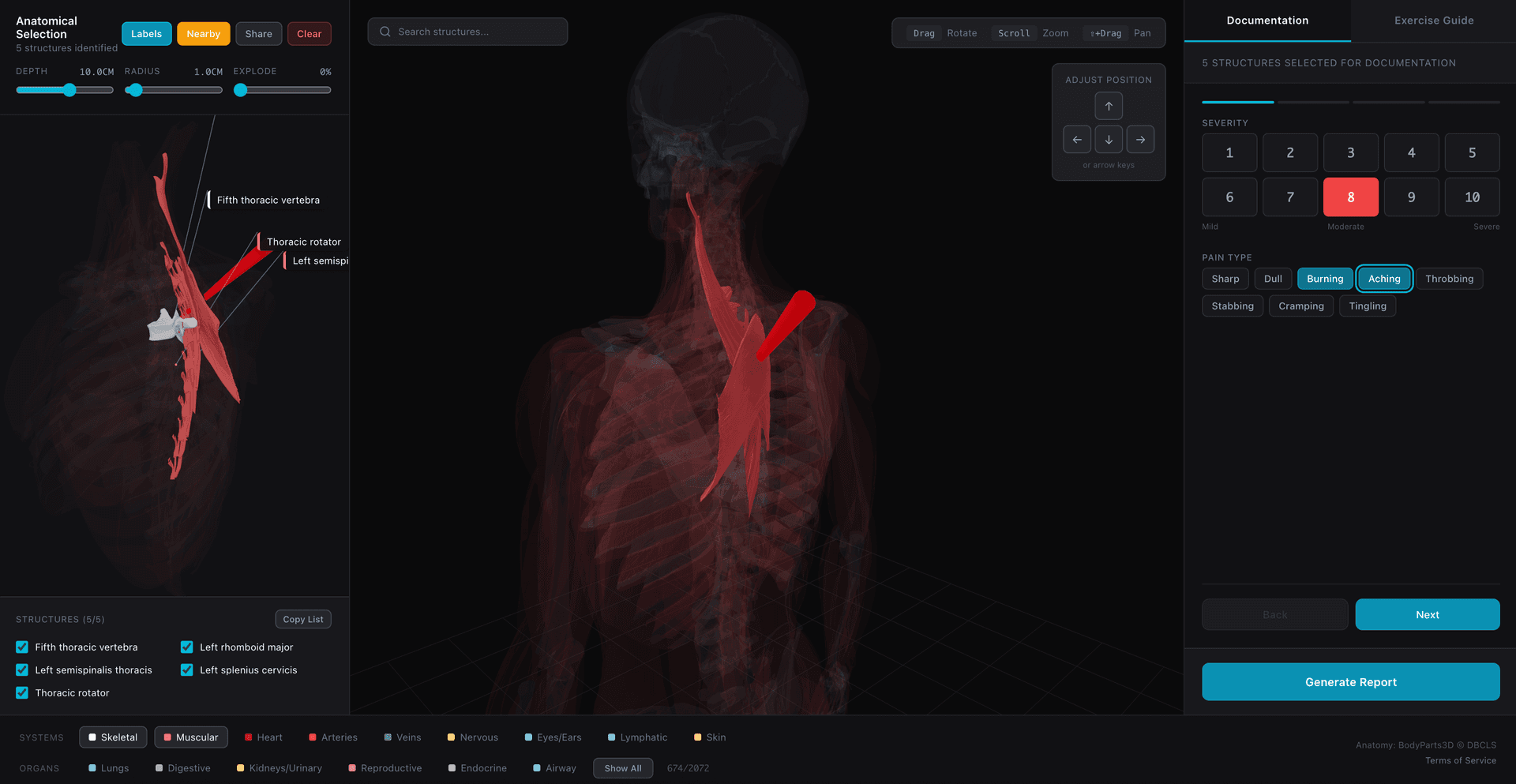
Pinpoint Clinical Mode — 3D body visualization for patient consultations
Today
  • Drawing on paper with a pen
  • Pointing at wall posters
  • Googling anatomy diagrams
  • Patient forgets by the time they get home
  • 50-70% don't follow their treatment plan
With Pinpoint
  • Interactive 3D model on your iPad
  • Tap to highlight exact structures
  • Rotate, zoom, explain in real-time
  • Send the visualization to the patient
  • Patient revisits the 3D view at home
2,400+
Anatomical structures
9
Body systems
873
Exercises in library
30s
To show a patient

Built for the consultation room

Tap to highlight
Click any body region on the 3D model. The affected muscles, bones, and structures light up instantly.
Patient understands immediately
No more hand-drawn diagrams or anatomy posters. Rotate the model, zoom in, and show exactly what's going on.
Send to patient
Generate a shareable link after the consultation. Patients can revisit the 3D visualization at home.
2,400+ anatomical structures
9 body systems — skeletal, muscular, nervous, vascular, and more. Skin overlay for patient-friendly view.
Works on your iPad
Built for the consultation room. Open in your browser, no app install needed.
Free 7-day trial
Full access when you sign in. No credit card required to start.

Frequently asked questions

How do I use Pinpoint during a consultation?
Open Pinpoint on your iPad or computer. Switch to Clinical mode (the tab at the top). Tap the body area you want to discuss — the underlying anatomy highlights automatically. Rotate the model to show different angles. When done, hit "Send to Patient" to generate a link they can view at home.
Can I show just the skin and muscles?
Yes. Clinical mode defaults to the skin and muscular systems. You can toggle any of the 9 body systems (skeletal, nervous, vascular, etc.) on or off using the system bar at the bottom.
What does the patient see when I send them the link?
They see the exact same 3D view you showed them — the highlighted structures, the camera angle, everything. They can rotate and zoom but can't modify the selection. No account needed to view.
Is this a medical device or diagnostic tool?
No. Pinpoint is an educational visualization tool. It helps you communicate with patients using accurate 3D anatomy, but it is not intended for diagnosis, treatment planning, or clinical decision-making.
What does it cost?
Signing in gives you a free 7-day trial with full access. After that, Pro is $2.90/month, $29/year, or $48 for lifetime access.
Do I need to install anything?
No. Pinpoint runs in your browser — Chrome, Safari, Firefox, or Edge. Works on desktop, tablet, and modern phones.
Is patient data stored?
Shared visualization links contain only anatomical selections (which structures are highlighted and the camera angle). No patient names, medical records, or personal health information is stored or transmitted.
Can I use this for patient intake?
Yes. You can send patients a Pinpoint link before their appointment and ask them to mark where it hurts. They can share the result back with you.

Try it with your next patient

Free to start. No credit card required.

Open Clinical Mode